Setup
Wappalyzer phones home constantly by default: Every URL you visit gets sent to the Wappalyzer people, even if you’re on a private network.
Turn that off.
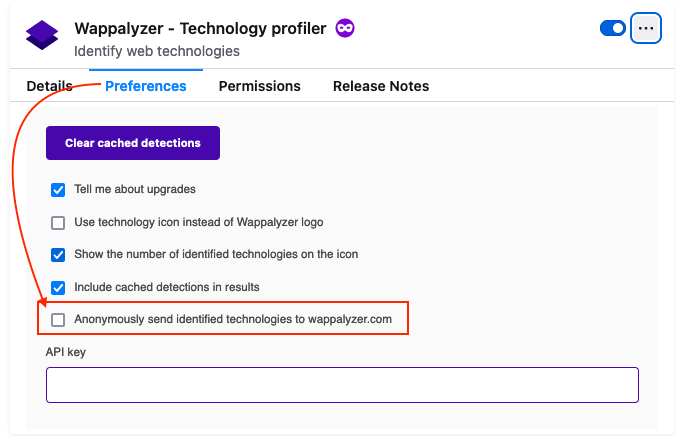
Extension Icon > Gear > Preferences > UN-check “Anonymously send identified technologies to wappalyzer.com”
Reporting
Also: Wappalyzer tells you what it found, but not where. And someone who has to fix it is going to need to know where the old version is.
Try to include full URLs for the stuff it complains about. One easy way is to use Wappalyzer along with Retire.js in Burp Suite, then you can right-click in Burp Results and do “copy URL” to paste into the report.
Better Screenshot When Stuff Doesn’t Fit
(Via Jack in Teams, 6/19/2023)
Right-click and hit “save page as” Open local copy in browser Use Inspector (Ctrl-Shift-I) to give it more space Change “max-height” from “34rem” to “310rem” (or whatever works) Add the URL as text in the report, since the URL will be a local one now (todo: why not use Inspector on the live page instead?)