Skyhook is a round trip obfuscated file transfer server that aims to replace SHTTPSS. It supports a variety of obfuscation algorithms and is highly configurable.
Admin vs File Server
Skyhook is composed of two servers:
- Admin Server - Which is used to manage files, configure obfuscation, and obtain pre-generated links to access the file server.
- File Server - The server used to transfer files.
- The paths for this server are randomized.
- Use the admin server to get links matching the randomized paths.
DANGER
DO NOT use the admin server from an untrusted, i.e., customer, host because it will disclose user credentials and obfuscation details.
Basic Usage
- On a non-customer host, authenticate to the administrative server using admin credentials.
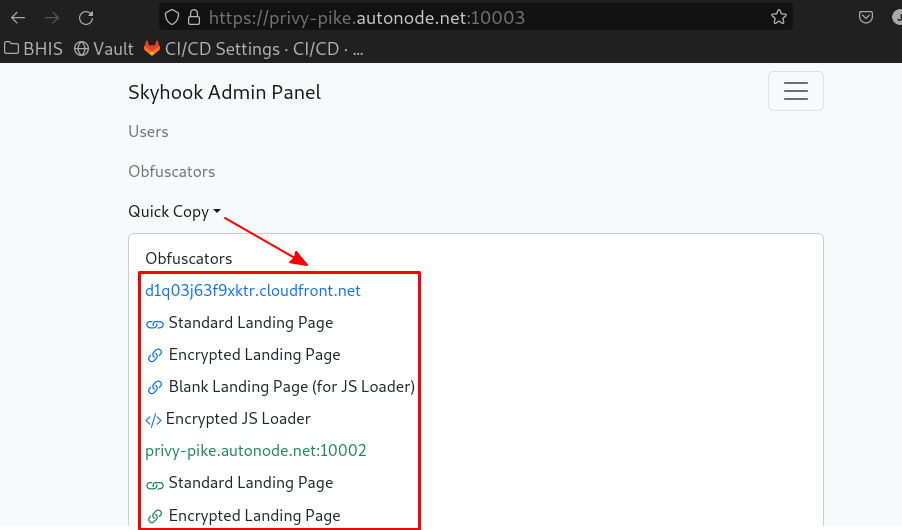
- Use the Quick Copy functionality to copy the URL to the file server.
- On a customer host, paste the URL into a web browser and visit the page.
- Note: use non-administrative credentials to log in.
- You should now be able to browse and download files.
- See this section if the interface fails to load.
Advanced Usage
Encrypted Loader
If the Skyhook web interface is being blocked at the perimeter, there is an encrypted variant that may facilitate a bypass.
Using Standard Encrypted Loader
- From the admin interface, retrieve the Encrypted Landing Page link via Quick Copy.
- Visit that link in the target browser.
Blank Landing Page Loader
This is useful in situations where the standard encrypted loader is being blocked.
WARNING
This technique requires access to developer tools in the browser.
- From the admin interface, retrieve the Blank Landing Page (for JS Loader) link via Quick Copy.
- Visit that link in the target browser.
- Open developer tools in the tab where the blank page resides and navigate to the Console tab.
- From the admin interface, retrieve the Encrypted JS Loader via Quick Copy.
- In the target browser’s developer console, paste the encrypted loader into console tab and hit enter.
- The page should now be loaded.
How Does the Encrypted Loader Work?
Each artifact is XOR encrypted before being delivered to the browser. JavaScript is used to retrieve and decrypt each artifact before loading it into the DOM.
A two-staged “loader” is used to decrypt each artifact:
- Stage 1
- Exists to protect the Stage 2 loader that’s responsible for loading and decrypting interface artifacts.
- It’s dynamically generated and encrypted with a substitution cipher, the key for which is embedded in the source itself. It should be difficult to fingerprint since the key changes with each render.
- Stage 2
- Performs the following on each interface file:
- Pulls it as an encrypted artifact.
- Decrypts the artifacts.
- Evaluates the artifact, resulting in it being loaded into the DOM.
- Performs the following on each interface file:
How to Get Links to the File Server
A Quick Copy button is available in the admin server’s interface. This includes a list of links, organized by FQDN, that can be copied to your clipboard for convenience.