When standing up an evil twin wireless network for credential capture or credential relay attacks, it can be useful to first connect to the legitimate infrastructure in order to capture certificate details for use in generating a facsimile of the original certificate. The facsimile will not have the same hash as the legitimate certificate, so it will not fool a client device that is configured to validate the certificate of the authentication server. However, if a user manually connects their client and inspects the certificate details presented during negotiation, it will be difficult for a non-technical user to distinguish the fake authentication server from the legitimate one.
Procedure
-
Initiate a connection to the legitimate network using a mobile device.
-
Submit invalid credentials to the authentication server when prompted.
If the organization generated the certificate for the authentication server using their internal Certificate Authority (CA), then you should be presented with a prompt to trust the certificate being presented by the authentication server.
If no prompt is presented (and you just get a username/password prompt) then the certificate was issued by a trusted public CA. You will be unable to gather certificate details necessary to create a facsimile of the legitimate certificate.
-
Click the certificate details link presented on the trust certificate prompt.
-
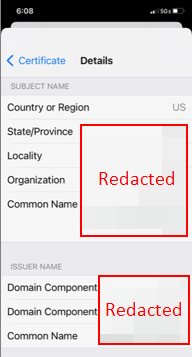
Record the following details from the legitimate certificate:
- Country or Region
- State/Province
- Locality
- Organization
- Common Name
-
Use the recorded details during generation of the fake authentication server certificate.
Example certificate details output is shown below.