Simple HTTPS Server
SHTTPSS is a quick and dirty HTTPS server that can be used to host files that can be then downloaded during an engagement.
Capabilities
- Uploading and downloading of moderately sized files
- On-the-fly SSL/TLS certificate generation
- Also accepts user-supplied certificates
- Obfuscated file transfers
- Can Base64 encode files prior to transit to assist with detection avoidance
- Multiple iterations can be applied
- JavaScript embedded in the interface will decode the files prior to being written to disk
- Note: JavaScript decoding can lock a browser in situations when the file size is large. 5mb and less is recommended!
Procedure
- Clone the repository
- Enter the repository directory
- Install dependencies:
./install.sh - Create a webroot directory:
mkdir webroot - Start the server
Here is a “kitchen sink command” to start the server:
server.py -i "<interface_ip>" -p "<port>" -wr webroot \
  -bu "<username>" -bp "<password>" \
  -eu -dc \
  --keyfile "<ssl_cert>" --certfile "<cert_key>" \
  --enable-b64
The above command will start the server
- single user authentication
- with a supplied SSL certificate and key
- enables uploads
- disables browser caching
- enables base64 encoding/decoding capabilities
Additional Information
Universal Arguments
These arguments are always required:
--interface(-i) - IP address of the interface to listen--port(-p) - Port to listen on--webroot(-wr) - Directory used to serve web content- For SSL certificate selection:
--generate(-g) - Generate a self-signed certificate- OR
--certfile(-c) and--keyfile(-k) - Configure custom cert parameters
Serving with an Auto-Generated Self-Signed Certificate
Just start the service with the --generate flag.
server.py -i 143.198.61.237 -p 443 -g -wr "<webroot_directory>"Serving with an On-Hand Certificate
Include the --certfile and --keyfile arguments to provide a customer SSL certificate configuration.
server.py -i 143.198.61.237 -p 443 -wr "<webroot_directory>" \
 --keyfile certs/privkey2.pem --certfile certs/cert2.pem \
Server-Side Double Base64 Encoding of Files
- This capability currently is practical only for files with a size of about 5mb.
- You can attempt usage on files larger than this as there is no limitation imposed by client-side or server-side logic, but the outcome can not be guaranteed to be positive.
It’s possible to have the server double base64 encode files prior to delivery, which often bypasses perimeter controls for file infiltration/exfiltration. Just pass the --enable-b64 to enable this capability.
Browser-Side Base64 Encoding/Decoding
The web interface includes two check boxes to manage this behavior:
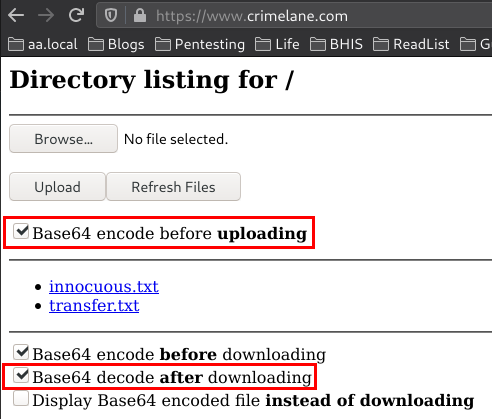
Encoding
The server will decode the file for you upon upload to the webroot. This will inject JS into your browser and encode files prior to upload.
Decoding
This capability is not opsec friendly as it allows the browser to fingerprint the final file. Chrome will detect malicious content, as likely will other browsers.This will inject JS into your browser to decode the files upon delivery. Convenient, but risky.