Reconnaissance Checklist
Reconnaissance Preparation
Gather necessary API keys
Several OSINT services offer API keys useful for programmatically querying their services. This can provide significant time savings since those keys can be used with automation frameworks like Recon-ng. The link provided below provides recommendations for API keys useful for typical reconnaissance activities using tools like Recon-ng. Testers should have ALL tools necessary to perform reconnaissance on their own.
- Gather API keys
ROE call - identify in-scope companies/domains
Larger organizations may have parent-child, sibling, or other relationships that may be useful to explore. The implications of these relationships should be discussed with the customer during the ROE call or shortly after the start of the engagement. Red Team exercises are likely to have a much looser scope than External Penetration Tests.
- Discuss in-scope organizations with customer.
- Discuss in-scope domains with customer.
Intern reconnaissance request
Scripted reconnaissance is typically performed by an intern as a starting point for full reconnaissance associated with an engagement. Intern reconnaissance is requested by navigating to the Interns-Team > Recon Room Microsoft Teams channel. The submission should include the in-scope customer names, the in-scope domains, project identifier, and delivery date, like the following:
Recon Request: (company name/project identifier) Company(ies): (in-scope companies) Domain(s): (in-scope domains) Needed by: (target date)
- Submit intern reconnaissance request
Reconnaissance Execution
Intern reconnaissance review
- Fully review intern reconnaissance report and correct any errors, using the steps listed below as a guide
Company profile
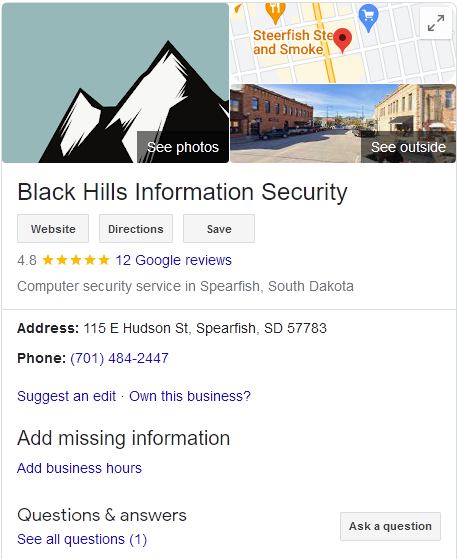
- Perform a basic search engine search on the target organization. Note interesting details in report including employee count, business vertical, subsidiaries, etc. These details usually appear in a separate pane on the right-hand side of Google search results. An example is shown below.
DNS Analysis
Domain Name System (DNS) records can provide a wealth of information about an organization. DNS records can be used to identify service providers, email protections, security products, network blocks, autonomous system numbers (ASNs), and other information useful in formulation of attacks against the organization.
DNS Dumpster
- Paste the following CSS snippet into the browser console to change the default color scheme used by the application. This will make screen captures more readable.
javascript:var jq = document.createElement('script');jq.src = "//ajax.googleapis.com/ajax/libs/jquery/1/jquery.min.js";document.getElementsByTagName('head')[0].appendChild(jq); setTimeout(function() {jQuery.noConflict(); console.log('jQuery loaded'); }, 1000);void(0);

$('body').css('background-color', '#fff');
$('body').css('text-shadow', '0 0 0 rgba(255,0,0,0)');
$('body').css('color', '#000');
$('section').css('background-color', '#fff');
$('button').css('background-color', '#fff');
$('[style*="color: #ddd"]').css('color', '#000');
$('[style*="color: #eee"]').css('color', '#000');
$('[style*="color: #bbb"]').css('color', '#000');
$('[style*="color: #777"]').css('color', '#000');

$('svg').css('filter', 'invert(100%) contrast(25%) saturate(400%) hue-rotate(180deg)');
$('.jvectormap-container').css('background-color', '#fff');
- Analyze NS records
- Does the organization provide its own DNS?
- Is the service provider interesting?
- Analyze MX records
- Does the organization provide its own mail services?
- Does the organization use a mail security provider (proofpoint, ironport, etc)?
- Does the organization use O365 (protection.outlook.com)? (Check DirectSend spoofing during active testing)
- Analyze TXT records
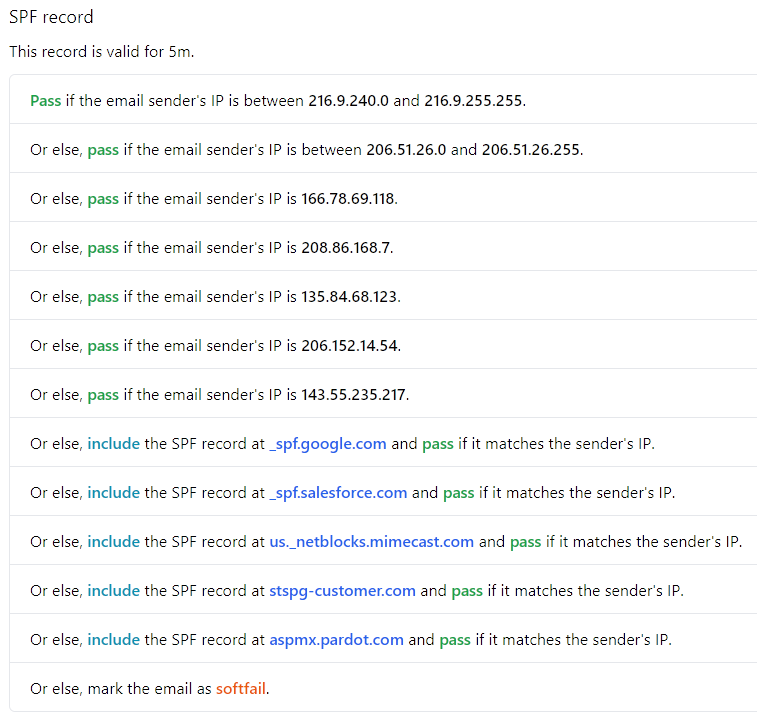
- Does the organization publish SPF/DKIM records?
- Any interesting authorized senders (organization IP addresses, third-parties, marketing mail campaign providers)?
- Soft fail or hard fail?
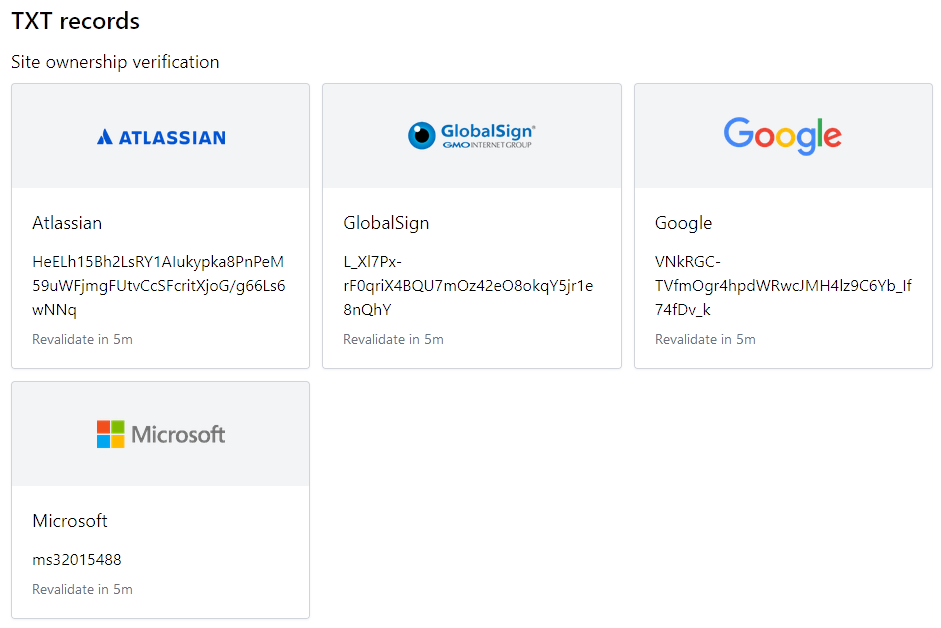
- Any interesting domain verification entries (see nslookup.io)?
- Analyze A records
- Any interesting hostnames?
- Any IP addresses or netblocks directly belonging to the customer?
- Review ASNs (far right column) for all records
- Any ASNs that can be directly attributed to the target organizations
- Record IP addresses associated with those ASNs
NSLookup.io
DNSDumpster provides a great deal of detail about an organization but does not parse and identify domain verification entries automatically. Nslookup.io provides output like the following that does not need to be manually parsed and a narrative breakdown of the SPF record.
Zone transfer
!!! Should we be doing this on intern recon? !!!
A successful zone transfer request will result in disclosure of all records associated with a given domain. The records may include details not present through other means.
- Is zone transfer allowed from any name servers? (dnsrecon -a -d target_domain)
Potential Typosquatting
- Are there any registered domains present that could represent a threat to the target organization (urlcrazy or dnstwist output)? Visit each variation with a registered IP address and report on anything fishy.
Netblock, IP, and Autonomous System Number (ASN) Determination
The goal of this phase of activity is identification of assets, in the form of network blocks, IP addresses, and Autonomous System Numbers (ASNs) that can be directly attributed to the target organization(s). Accuracy in identifying resources is prioritized over volume. Use of Recon-ng modules like the following are likely to generate inaccurate results:
- mx_spf_ip
- whois_miner
The resulting IP address and netblock lists are subsequently used during automated reconnaissance to identify hosts and open ports associated with the target domains. The following resources are useful for enumerating network blocks and IP addresses:
- Regional registrar Whois sites:
- ARIN Whois (https://whois.arin.net/ui/)
- RIPE NCC Whois (https://apps.db.ripe.net/db-web-ui/query)
- LACNIC Whois (https://www.lacnic.net/1040/2/lacnic/lacnics-whois)
- APNIC Whois (https://wq.apnic.net/static/search.html)
- AFRINIC Whois (https://afrinic.net/whois)
- Hurricane Electric Whois (https://rwhois.he.net/whois.php)
- Many others…
The following list of queries focuses on use of the ARIN Whois advanced search tool. Other tools have similar functionality.
- Perform POC Domain query using FQDN for taget organization.
- Click each POC record
- Click on Related Organizations
- Click on Organization link
- Click on Related Networks
- Record each associated network block
- Click each POC record
- Perform Organization Name query using wildcard variations on target organization.
- Click on Organization records
- Click on Related Networks
- Record each associated network block
- Perform Customer Name query using wildcard variations on target organization.
- Click on Organization records
- Click on Related Networks
- Record each associated network block
- Perform Delegation Name query using wilcard variations on target organization.
- Click on Organization records
- Click on Related Networks
- Record each associated network block
- Perform searches using interesting ASNs and IP addresses identified during DNS Analysis.
- Record each associated network block
Useful wildcard variations, based on the company “Company Name” might include:
- *Company Name*
- Company Name*
- *Company*
- Company*
Investigate any records, resulting from organization name, customer name, and delegation name searches that are believed to be directly related to the customer domain.
- Record all discovered network blocks in the reconnaissance report for scope validation on Red Team Exercises and comparison on External Penetration Tests
Automated Reconnaissance
Recon-ng
After identifying company names, network blocks, and IP addresses associated with an organization, those artifacts can be used to seed automated reconnaissance using a tool like Recon-ng.
- Install recon-ng modules
marketplace install recon
marketplace install reporting/csv
marketplace install reporting/html
marketplace install reporting/list
- Generate new workspace for target organization
- Set TIMEOUT and USER-AGENT options
options set TIMEOUT 30
options set USER-AGENT "Relevant user-agent string"
- Manually enter in-scope company names
- Manually enter in-scope domain names
- Manually enter in-scope network blocks and IP addresses
- Execute reconnaissance modules, focusing on transforming source data into relevant target information, typical modules executed include:
- domains-contacts/whois_pocs
- domains-hosts/bing_domain_web
- domains-hosts/certificate_transparency
- domains-hosts/google_site_web
- domains-hosts/netcraft
- domains-hosts/builtwith
- domains-hosts/shodan_hostname
- hosts-hosts/ssltools
- netblocks-hosts/shodan_net
- hosts-hosts/resolve
- hosts-hosts/reverse_resolve
- netblocks-hosts/reverse_resolve
- hosts-ports/shodan_ip
- [ ]
- Generate HTML report
- Set CREATOR to BHIS
- Set CUSTOMER to customer name
- Generate CSV report
- Include summary details from automated reconnaissance in the report.
Recon-ng modules are named using the source table first, then a dash (-), followed by the destination table. This naming convention identifies the converstion of source data into destination data (i.e. netblocks into hosts). As a result, if a module produces new hosts as a result of execution, re-running modules that use hosts as input may be useful.
Accuracy in identifying resources that can be directly attributed to the customer is prioritized over volume. Avoid use of Recon-ng modules like the following that are likely to generate inaccurate results:
- mx_spf_ip
- whois_miner
OWASP AMASS
Email Address Enumeration
Access to valid email addresses can aid in social engineering and authentication attacks. It can also provide insight into the format of internal Active Directory usernames. Email addresses can be harvested from https://hunter.io. Credentials for this service are available in LastPass.
- Submit the in-scope customer domain(s) to hunter.io.
- Export CSV results for use in active testing
- Note the suspected email address format, if any, in the report
Third-Party Breach Data Enumeration
Third-party breach data can be an additional source for valid email addresses and may provide passwords useful for credential stuffing attacks externally or expose password patterns useful for password spraying attacks both externally and during post-compromise phases of testing. The Goldmine leak database is a useful source of third-party breach results.
- Download the hoardd client from github at https://github.com/hoardd/hoardd-client/releases.
- Generate a configuration file for Goldmine using the details found in the LastPass entry notes.
- Execute the hoardd client, passing in in-scope customer domain(s) to produce CSV results for use in active testing.
- Identify the number of unique email addresses and the presence of credentials in the report.
CMS Analysis
An organization’s main web presence may provide an avenue for attacking the organzation. Content Management Systems (CMS) are a common choice for building and maintaining that web presence. Identifying the CMS technology may aid in formulating attacks against the organization as CMS vulnerabilities may be used as a watering hole for customers and/or employees of the target organization.
The https://whatcms.org site can be used to anonymously detect the underlying technology related to a given domain. Identification of the CMS is often follwed by some form of scanning during the active phase of testing.
- Submit the in-scope customer domain(s) to https://whatcms.org.
- Record interesting results in the reconnaissance report.
Cloud Provider Analysis
Increasingly, organizations are using cloud providers for various services. Those services may expose the ability to perform enumeration of organizational resources, execute authentication attacks, or may directly expose sensitive information to the public.
Cloud Provider Username Enumeration
Cloud providers like Microsoft 365 and Google GSuite suffer from username enumeration on their respective login pages. Submitting a valid email address to the login page of a given service may be enough to confirm the use of those services by the organization.
- Submit a valid email address to https://login.microsoftonline.com.
- Submit a valid email address to https://accounts.google.com.
- Record results indicating usage in the reconnaissance report.
Valid email addresses for the above checks may be selected from Email Address Enumeration or Third-Party breach data assembled above. The email address of the point of contact may also be used for this purpose.
When recording results in the report, be sure to capture relevant details. Does the submission result in an error (service not used), proceed to generic password form or customer branded password form (service used), redirect to an external SSO provider, or redirect to some on-premises service like Active Directory Federated Services (ADFS)?
Microsoft 365 Reconnaissance
If the organization is found to use Microsoft 365 products, additional reconnaissance should be performed against the organization’s tenant. These actions can be performed using the AADInternals project without needing credentials.
- Perform Microsoft 365 reconnaissance against the customer domain(s) AADInternals.
- Open an elevated PowerShell window
- Execute Install-Module AADInternals
- Execute Import-Module AADInternals
- Execute reconnaissance using Invoke-AADIntReconAsOutsider -DomainName customer_domain | Format-Table
- Identify domains serviced by the tenant in the reconnaissance report
- Identify whether DesktopSSO is enabled on the tenant
Cloud Resource Enumeration
Cloud resources deployed in Google Cloud Provider (GCP), Amazon Web Services (AWS), or Microsoft Azure may be improperly exposed, resulting in risk to the target organization. Checks can be performed using the Grayhatwarfare (Credentials in LastPass) search engine or cloud_enum script to identify publicly exposed resources.
- Submit variations on the company name to Grayhatwarfare.
- Investigate interesting results
- Record summary details in the reconnaissance report
- Execute cloud_enum with keyword variations for the target company
- Investigate interesting results
- Record summary details in the reconnaissance report
Public Document Analysis
Search engine searches can be used to identify various types of office automation documents associated with a given organization. The contents and metadata associated with those documents may contain information useful for executing attacks against the organization.
Metadata may include employee full names, usernames, email addresses, internal hostnames, IP addresses, UNC paths, applications titles and versions used by the organization. Document content may also include useful details about the organization such as event details, business relationships, lists of email addresses, phone numbers, among others.
- Execute PowerMeta