CyberChef
Shockingly capable data munger. Encode, decode, pretty-print, encrypt, decrypt, find/replace, regexes, OCR, create/read QR codes…
https://gchq.github.io/CyberChef/ (beware of other locations that may be less trustworthy)
How To
It’s cleanest to share these recipes in their JSON version, though you can also just copy-paste the URL from your address bar when you’re looking at the recipe you want to share.
To use the human-readable version of a recipe here:
- Copy the JSON to your clipboard.
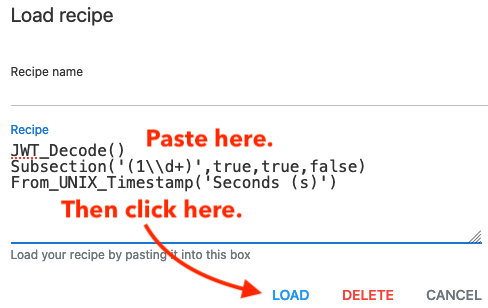
- In Cyber Chef, click the folder icon above the Recipe (“Load Recipe”)
- Paste the JSON into the “Recipe” box that pops up and click “LOAD”
- Ignore the “Recipe name” field - that’s there because it’s expecting to load a recipe from your LocalStorage. What you’re doing here has no effect on LocalStorage.
-
- Ignore the “Recipe name” field - that’s there because it’s expecting to load a recipe from your LocalStorage. What you’re doing here has no effect on LocalStorage.
-

To get the human readable version of a recipe to share:
- Click the “Save” icon above the Recipe (“Save Recipe”)
- Copy the recipe
- Paste it here.
Useful Recipes
Add anything non-trivial that you’ve found helpful so the rest of us can play, too.
To get these, you can usually just copy the URL from the browser when you’re looking at the recipe, but you can always get it by clicking the “Save” icon and using the “Data link”. If you’re operating on customer-identifiable data, be sure to uncheck the “Include input” box.
Decode Nmap “Unknown Service” fingerprint
Input: the Nmap output lines about “please submit the following fingerprint”. Include that header line or not, followed by all of the lines that start with “SF:”
Output: An unescaped string of whatever was in there, with a “To Hexdump” option at the end (disabled by default)
JWT
Decode a JWT and show the header and the claims. The built-in JWT_Decode only shows the claims.
Find_/_Replace({'option':'Regex','string':'(\\.[^.]+)$'},'',true,false,true,false)
Fork('.','\\n',false)
From_Base64('A-Za-z0-9-_',true)
JSON_Beautify('    ',false)
Translate all of the epoch timestamps in JWT claims into readable datetimes and show them in place of the original integer:
JWT_Decode()
Subsection('(1\\d+)',true,true,false)
From_UNIX_Timestamp('Seconds (s)')
References
URL-encode only the parens. Paste a Cyber Chef recipe URL into this recipe and get text that you can paste into the link part of a Markdown link (which treats parens as its delimiters).
https://gchq.github.io/CyberChef/#recipe=Find_/_Replace(%7B'option':'Simple%20string','string':'('%7D,'%2528',true,false,true,false)Find_/_Replace(%7B'option':'Simple%20string','string':')'%7D,'%2529',true,false,true,false)&input=SldUX0RlY29kZSgpU3Vic2VjdGlvbignKDE2JTVDJTVDZCUyQiknLHRydWUsdHJ1ZSxmYWxzZSlGcm9tX1VOSVhfVGltZXN0YW1wKCdTZWNvbmRzJTIwKHMpJykmaW5wdXQ9WlhsS2FHSkhZMmxQYVVwSlZYcEpNVTVwU1hOSmJsSTFZME5KTmtscmNGaFdRMG81TG1WNVNrWmlibHB3WTIwNWRXSlhWblZrUlhSc1pWTkpOa2x1VFhkTlNFSnNZMnR6ZW1WVFNYTkpiRlo2V2xoS1QxbFhNV3hKYW05cFdWZFNkR0ZYTkhOSlNFSjVZakpLYUZsdGVEVkphWGRwWW0xS2JVbHFiM2hPYWxsNlRVUkJkMDFxWjNsTVEwcHNaVWhCYVU5cVJUSk9hazEzVDBSWk1rOUVTWE5KYld4b1pFTkpOazFVV1RKTmVrRjNUVVJKTkUxdU1DNWtSMmh3WTNsQ2NHTjVRblZpTTFGbldWTkNlVnBYUm5OSlNFNXdXakkxYUdSSVZubGFVUSk